Published byforahobby on 2006-05-11 Category: Xbox 360 | Page Views: 155495
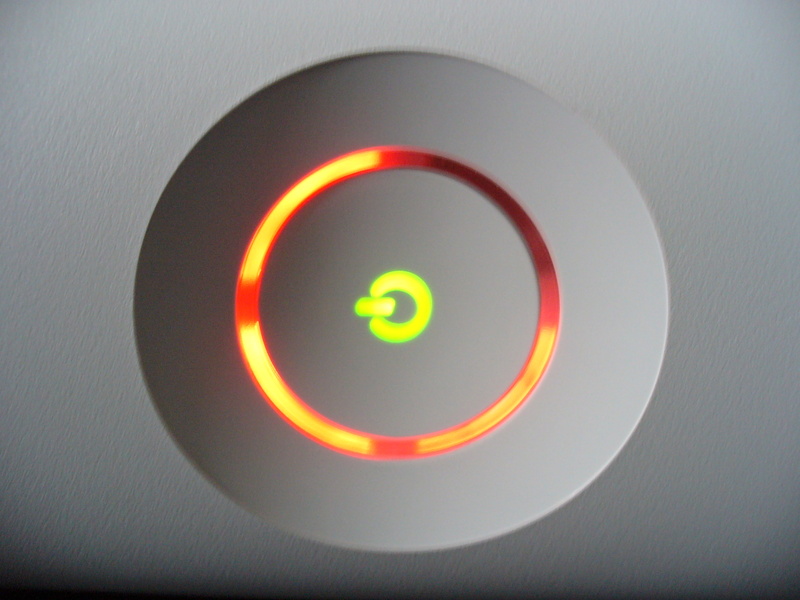
Whenever the Xbox 360 Console has a problem it will display error lights/codes.. These lights/codes are used to determine the problem with the console. There are many different patterns which will also show a numbered error code. These numbered error codes are shown below with their corresponding LED Code and may helped you with your trouble shooting..
Instructions:
If you have encountered one of these service errors:
- look up the code in the list below
- read the info
- read the solution (very important )
- if possible, read any related topics or our official topic here.
Leds 1, 2, 3, and 4 are flashing red:
Related topic(s) on 360-Hq.Com: none
Info:
The AV cable cannot be detected by the console
Solution(s):
- Make sure that the AV cable is correctly connected to the Xbox 360 console.
- Disconnect the AV cable from the Xbox 360 console, and then reconnect the AV cable to the Xbox 360 console.
- If the four flashing red lights continue to flash, try wiping the metal area of the AV pack with a dry cloth. The metal area is the end that plugs into the console. Wipe the metal area thoroughly, and then try the AV Pack again.
- If the AV cable is correctly connected but the four red lights are still flashing, substitute a different AV cable if you have one available.
Leds 1, 3, and 4 are flashing red:
Related topic(s) on 360-Hq.Com: none
Info:
General Hardware Failure
The specific type of hardware failure can be determined by a "hidden" error code:
- Turn the xbox 360 on, and wait till the 3 red lights are flashing.
- Press and hold the sync up button (the small white one), while holding that button press the eject button.
- The LEDs will now blink the first number in the code (as described below).
- Release the eject button and press it again.
- The LEDs will now blink the second number of the code.
- Release the eject button and press it again.
- The LEDs will now blink the third number of the code.
- Release the eject button and press it again.
- The LEDs will now blink the forth number of the code.
- Release the eject button and press it again.
- The LEDs will go back to the 3 red flashing lights.
You should be able to determine the difference between the 3 flashing lights and the error code lights by the rate in which they flash.
Here is how you interpret the LEDs to get the code number:
* All four lights flashing - 0
* One light flashing - 1
* Two Lights flashing - 2
* Three lights flashing - 3
0001 - power supply problem 0002 - power supply problem 0003 - power problem could be the PSU could be the GPU/CPU, somehow the console isn't getting clean power from the power supply. 0010 - over heating 0011 - over heating 0012 - over heating 0013 - over heating 0020 - not yet known, possibly overheating 0021 - DVD Drive Time out - Can be caused by problems with a firmware flash. This is also speculated to sometime be caused by a problem with the southbridge chipset on the motherboard. 0022 - GPU Error / GPU Overheating 0102 - unknown error - littereally means the console does not know what is wrong. possibly a short or cold solder joint somewhere (2 reports of people repairing this, one was removing moisture build up inside the console, the other used a hot-air rework to reflow the BGA Ram chips) 0110 - 0110 is a cold solder joint below one of the RAM bricks, mostly the ones under the GPU heatsink. Fix: Heatgunning the RAM 1022 - not yet known
Solution(s):
- Try restarting the console.
- If restarting the console does not resolve the behavior, follow these steps:
* Turn the console off.
* Unplug all the power and AV cables from the console.
* Unplug the power cord from the wall socket.
* Firmly reconnect all the cables.
* Turn on the console.
- If these steps do not resolve the behavior, turn the console off, remove the hard drive, and then turn on the console. If the 3x Red LED error light is no longer displayed, turn the console off, re-attach the hard drive, and then turn on the console.
Sections 1, and 3 are flashing red:
Related topic(s) on 360-Hq.Com: none
Info:
Overheating
Solution(s):
- Let the Xbox 360 console cool. You may have to wait several hours for the console to cool enough. Do not turn on the console when the console is hot.
- Verify that the console has sufficient ventilation and that the fan is operating. For more information about ventilation, see the "More Information" section.
Led 4 is flashing red
Related topic(s) on 360-Hq.Com: none
Info:
Hardware Failure
The Specific Type of hardware failure can be determined by the error code displayed on the screen.
The Specific Type of hardware failure can be determined by the error code displayed on the screen.
If the screen is blank or you would like additional information follow the instructions for determining the secondary error code in the section below.
E01:
possibly a power supply problem
E02:
possibly a Network Interface problem (might be fixed by loosening the x-clamps)
E03:
possibly Power problem could be the PSU could be the GPU/CPU, somehow the console isn't getting clean power from the power supply.
E04: Unconfirmed:
There is a problem with the Southbridge Chip usually dealing with how it connects to the mainboard (cold solder joint/bridged solder joints)
E05: CPU over heating
If you are receiving this error after disassembling your console make sure to all 8 of the heatsinc screws are tightened securely to the board/heatsink holes.
E06:
GPU over heating -ensure your x-clamps are installed properly.
E07:
RAM over heating
E08: Unconfirmed:
General I/O Malfunction, could be caused by an error with any of the I/O devies such as A/V port, USB, Hard drive, DVD drive, etc. over torquing of the AV or heatsync bolts can cause this error.
E09: Unconfirmed:
This can be caused by two completely different things either:
A. DVD Drive Time out - Can be caused by problems with a firmware flash. This is also speculated to sometime be caused by a problem with the southbridge chipset on the motherboard based on how it connects to the DVD drive.
B. GPU error - generally caused by a poor connection to the mainboard (cold solder joints/bridged solder joints) See error E18 for more information
E10: Unconfirmed:
CPU error, generally caused by a poor connection to the mainboard (cold solder joints/bridged solder joints). This can also be triggered by an error with the TSOP.
E11:
(not yet known)
E12:
Possibly a problem with temperature control
E13: Unknown:
could be caused by a short between the heatsink and surrounding capacitors
E14:
(not yet known)
E15:
(not yet known)
E16: Unknown:
Likely a cold solder join in GPU or Ram chips (see error E18)
E17:
(not yet known)
E18:
Error in the "Digital Backbone" (CPU/GPU/RAM), this is usually caused by a cold solder joint between the GPU and the mainboard.
There are two theories to fixing this one deals with the "X" clamps that hold down the chips. The other involves re-Heating the chips. DO NOT attempt either of these if your console is still under warranty. If your console is still under warranty return it to the store where it was purchased or call MS to have it replaced.
E19: Unknown:
GPU Error this is usually caused by bridged solder points where the GPU connects to the mainboard. see error E18 for more detailed information
E20:
likely a Ram error, this can be caused by a cold or bridged solder joint on one of the Ram chips.
E32:
(not yet known)
E33:
(not yet known)
E34:
(not yet known)
E35:
over heating GPU possibly due to lack of thermal compound.
E45:
Unknown (possibly dashboard update related)
E64: DVD Drive Error
Dvd drive timed out during reset :Wrong firmware, dvd is without f/w chip, etc. This can also be caused by the tray not being fully closed on boot. also it could mean that the Kernel can't be launched/signature in NAND Flash chip is broken It could be possible after bad update. This might also be caused by a bad SATA cable.
E65: DVD Drive Error
Dvd drive is not DMA configured :Wrong firmware, dvd is without f/w chip, etc. This can also be caused by the tray not being fully closed on boot.
E66: DVD Drive Error
Dvd drive pairing failure: DVD model, or version does not match that of the version expected by the dashboard. OR the firmware version on the drive is older then the firmware version expected by the dashboard. Make sure the DVD drive is of the same version originally included with the console and that it is using either the original firmware included with the console or newer. if drive can eject, read, and write under windows but errors on console, replacing original firmware should fix issue.
E67: Hard Drive Error
Hard drive timed out during reset: It could be a problem with the Hard Drive itself or a problem with the internal connection to the hard drive, Try removing the hard drive and playing without it.
E68: Hard Drive Error
Hard drive not DMA configured: It could be a problem with the Hard Drive itself or a problem with the internal connection to the hard drive, Try removing the hard drive and playing without it. Also this can be caused by a problem with the fans that make them draw too much power, it can also be caused if you have unnecessary accessories attached to the console like an external fan unit. Attempt to remove unnecessary accessories first, and then necessary components such as the hard drive and USB devices. If you have any case mods you may want to investigate those as well.
E69: Hard Drive Error
Reading the HD Security sector failed: It could be a problem with the Hard Drive itself or a problem with the internal connection to the hard drive, Try removing the hard drive and playing without it
E70: Hard Drive Error
Hard drive not found
E71: Dashboard Error
Error within Xam.xex: possibly a dashboard update error, Check below in the "Console Reset Codes" for instructions. If that does not work there is no other solution and the console must be sent back to MS for repair.
E72: Dashboard Error
Error within Xam.xex: Like a problem with the NAND flash
E73: I/O Hardware Error
Couldn't calibrate HSIO Bus from edram: this error is likely caused by a problem with the Ethernet port or supporting control devices
E74: I/O Hardware Error
HSIO related, could be crc error, or many things: There is high chance it's a scaler chip problem (the "ANA" or "HANA" chip near the AV cable connection) it can also be caused by a faulty AV cable so check that first. Microsoft covers this error under their 3-year warranty, this is availble to anyone who hasn't modified their console. contact MS to get a free replacement console before attempting to fix this yourself. Failing that this error In some cases it is a problem with the GPU and may be repairable by doing the x-clamp replacement (see error 0102)
Try using a different AV cable. If the AV cable is known to be working then there is a 90% chance it's a scaler chip problem (the "ANA" or "HANA" chip connected directly to the AV cable) in rare cases it is the GPU.
E75: Ethernet Error
Couldn't read ethernet phy vendor: Strange but sometimes caused by the DVD drive not being connected properly.
E76: Ethernet Error
Couldn't complete ethernet reset: This error is usually cased by the Ethernet port's controller chip, a dead chip may not cause the error but removing the Ethernet controller chip does, it may also be caused by other Ethernet related problems.
E77: Ethernet Error
phy request is already processing/reading reg failed/Failed to write reg: This error is sometimes caused by power problems with the RAM chips. It might be cause by a short between the heat sink and resistors or by more serious problems with the RAM.
E78: Dashboard Error
AsicId check failed
E79: Dashboard Error
Couldn't start xam.xex: probably a file system corruption, it could also be a problem with the Hard Drive itself or a problem with the internal connection to the hard drive, Try removing the hard drive and playing without it.
E80: Dashboard Error
Wrong LDV version in NAND Flash: This is in new dashboard. You have the update but haven't R3T6 resistor. You can:
-Downgrade to old dashboard, solder back the resistor and then update your xbox
-If you have CPU Key, get current NAND Flash image and fix LDV (just add 1 up to latest kernel). (See error 1100)
E81: Dashboard Related?
Corrupted NXE Dashboard install or other dashbaord related files.
If you are having issues with your xbox 360 console please post in our official error codes topic in our forums so that our other members and staff can reply.. You can find the official 360-hq Xbox 360 Error Codes topic.
Console Reset Codes
1. Clear All Installed Game Updates and Console CacheGo to the "system" blade
2. Select "memory"
3. Press Y on the HD symbol
4. Press X,X, Left Bumper, Right Bumper, X,X
5. A message will appear saying: "Do you want to perform maintenance on your Xbox 360 storage devices?" Select Yes
6. Clear Any Failed system updates that cause the console to error.With the console off, press and hold the sync up button (the small white one)
While holding the sync button press the power button to turn on the console
7. Continue to hold the sync button until the Console has booted up completely.
During the boot process the console should now remove/clear any failed Xbox 360 updates, allowing you to use it normally.
 HQ Network: 22,186 |
  Guests: 4294 |
 Members: 0


 Printer Friendly Page



 forahobby on 2006-05-11