Published byjfhi on 2007-02-04 Category: CD/DVD Creation | Page Views: 129847
Introduction
This tutorial will teach you the exact method i have used to successfully backup my original Xbox 1 games so that they will not be harmed in anyway...
Please Note
This tutorial is for those who have ALREADY Flashed or are planning to Flash their 360 DVD-Rom with Updated Firmware so that they can safely backup their original Xbox 1 games. If your 360 has not yet been Modified the Backups created using this tutorial will Not Work!
ALSO: Not all Xbox 1 games are Compatible for play on the 360, This Tutorial will only work for the Xbox 1 Games that are Compatible for play on the 360!!!!!
360-Hq.Com does NOT support piracy and only provides technical information like our tutorials so our members can safely protect their investments by backing up their original DVD's.
Required Items
- Xbox Backup Creator v2.3 (download) - Kreon v08.1 firmware - "pm me"
Let's Get Started
1. Insert xbox 1 Disc "I used Halo 2" into 162c
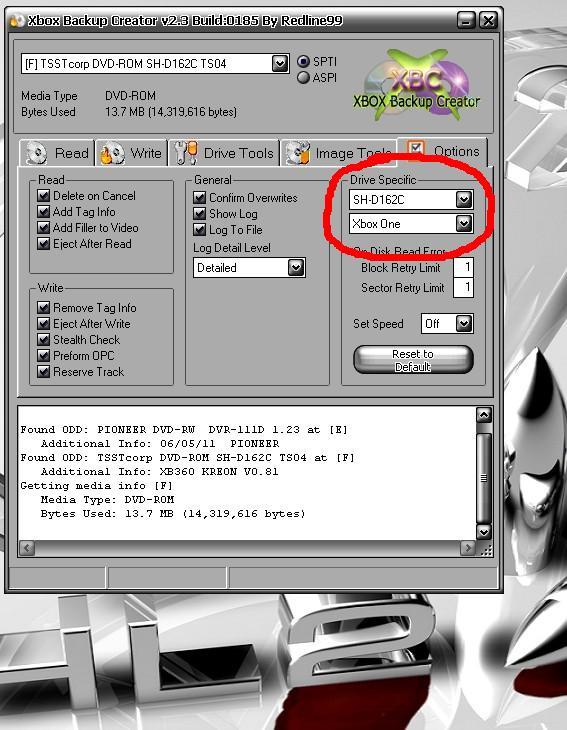
2. Open XBC and Click the "Options Tab"
3. Select SH-D162C and xbox 1 in the "Drive Specific" Box
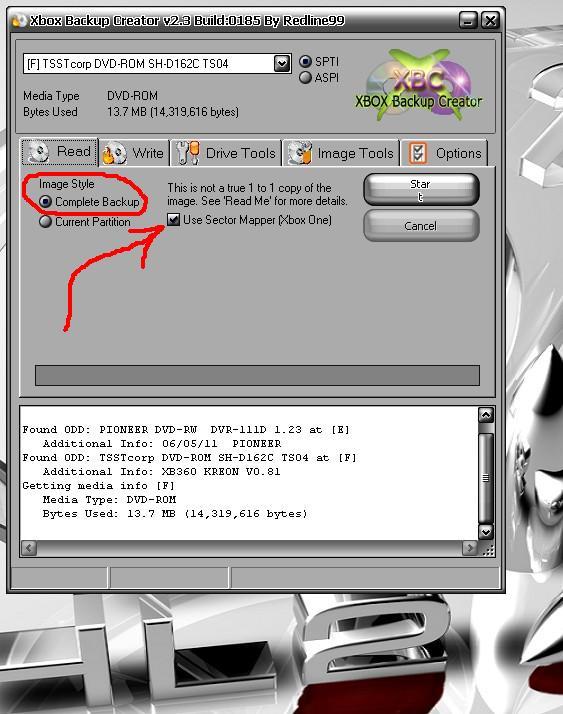
4. Now Click the "Read Tab" and Select Complete Backup and "Check" Use Sector Mapping
5. Click "START" a box will open, you can now Name the File and choose a folder to save your backup in.
6. Click Save and XBC Starts reading Disc! Now Wait until finished and Remove Disc and close XBC!
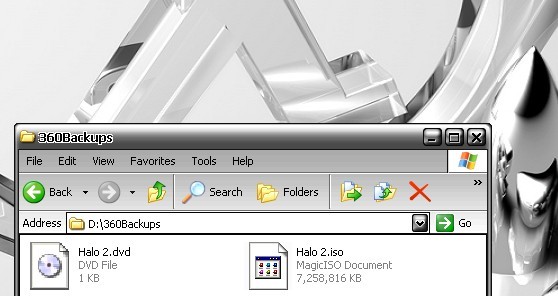
That's it for the Backup Part, All Done....... You should have 2 files in the folder you chose to save the backup in, Should look something like this:
Burn the .ISO
Burning Requires Dual Layer DVD Burner and Dual Layer +r Media!!!!!!!!
1. Put a Blank DVD+R Dual Layer Disc into your DL Burner,
1a. Note - I Used "Verbatim" Media and Pioneer DVR-111D Burner, Worked Perfect
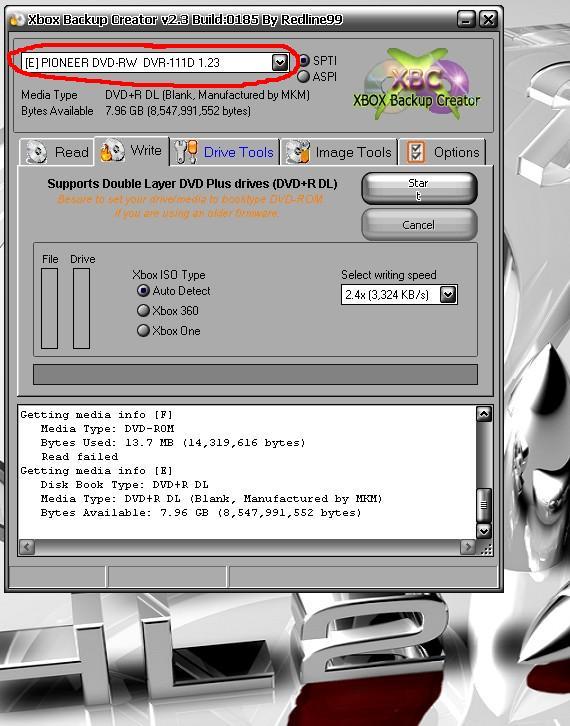
2. Open XBC, Click the "Write Tab" and Select your DL Burner in the Optical Drive Box:
3. Now Click "START" a Window opens and you can select the file you just Backep Up! Hit OPEN.
4. That's IT!!!!!!!!!!!! XBC starts Burning
5. Wait till Complete
6. Close XBC, Remove Fresh Backup
7. Put Fresh "STILL WARM BACKUP" into 360 and Enjoy Countless Hours of Halo 2 on your "Modded" or "Flashed" Xbox 360.
I hope this Info can Help, So Far all my Backup's Work Perfect. .You can now store your Original Disc in a Safe Place.........
 HQ Network: 10,141 |
  Guests: 5487 |
 Members: 0


 Printer Friendly Page



 jfhi on 2007-02-04